Good home services website design makes it easy for customers to understand what you do, see whether you serve their area, and get in touch. From browsing on a phone to requesting an estimate, every step should help people feel confident choosing your team. It includes everything from mobile navigation and local service pages to quote forms, scheduling, and lead routing.
For growing companies, those decisions shape the quality of inquiries, the efficiency of follow-up, and your ability to expand into new markets. This guide explains what your website should include, shares examples from Fratzke’s work, and helps you plan improvements tied to business results.
Key Takeaways
Make choosing your business easy. Help customers quickly understand what you do, where you work, and why they can trust your team.
Create a clear path to calling or booking. Fast, accessible pages, visible phone numbers, and simple forms make it easier to request service on any device.
Build visibility around your services and locations. Useful local content, consistent business information, and answers to customer questions support discovery through search engines and AI tools.
Connect website performance to revenue. Track which pages and marketing channels generate qualified inquiries, booked jobs, and repeat customers to guide investment.
Let evidence guide your next improvement. Identify where customers get stuck before committing to a redesign, and keep refining the experience after launch.
Why Home Services Website Design Matters
Home services websites are built for decisions made under pressure. A homeowner with a failed AC unit in July wants to know if you can come today, what it might cost, and whether they can trust the person who shows up at their door.
For home services companies, a website built for that moment delivers measurable business benefits:
More booked jobs from the traffic you already have. A visible phone number, a short request form, and clear next steps turn more visits into calls and appointments, without spending more to attract visitors.
Lower cost per lead across every channel. Paid search, Local Services Ads, your Google Business Profile, and direct mail all send people to your site. When that experience converts well, every one of those channels produces more leads for the same budget.
Trust earned before the first call.BrightLocal's 2026 Local Consumer Review Survey found 97% of consumers read reviews for local businesses. A site that puts reviews, licenses, warranties, and real team photos near the call to action answers trust questions before the homeowner picks up the phone.
Visibility in local and AI search. Well-structured service and location pages help you show up when homeowners search nearby, and when they ask AI assistants for recommendations. BrightLocal found the share of consumers using AI tools for business recommendations rose from 6% to 45% in one year.
Clear proof of ROI. With call tracking, form tracking, and CRM integration, you can see which pages and channels produce booked revenue and invest with confidence.
"Homeowners want to know three things: Can you help me, do you serve my area, and can I trust your team? Your website should make those answers easy to find." - Ryan Fratzke, Partner & Executive Strategist
Your website is also the hub every other channel points back to. Paid search, Local Services Ads, Google Business Profile, direct mail, and even the QR code on your truck all land somewhere. If that landing experience is slow or confusing, you pay for the lead twice. Our Digital Marketing for Home Services guide covers how the website fits into the full channel mix.
12 Essential Elements of a High-Converting Home Services Website
Every element below earns its place by doing one of three jobs: helping homeowners find you, helping them trust you, or helping them book you. Use the table as a quick scorecard for your current site.
Element
What It Does
Quick Check
1. Mobile-first layout
What It DoesServes the homeowner searching on a phone, often in a hurry
Quick CheckCan you call or request service with one thumb, without zooming?
2. Sticky click-to-call
What It DoesCaptures homeowners who want to talk to someone now
Quick CheckIs a tappable phone number visible on every page, including on scroll?
3. Online booking or quote request
What It DoesCaptures after-hours and self-service customers
Quick CheckCan someone request service in under 2 minutes?
4. Clear service area
What It DoesConfirms you serve the visitor's location
Quick CheckIs your service area visible above the fold on the homepage?
5. Service pages
What It DoesMatches specific searches and answers specific questions
Quick CheckDoes each core service have its own page with a CTA?
6. Location pages
What It DoesRanks in priority cities and supports multi-location growth
Quick CheckDoes each priority market have a unique page with local proof?
7. Reviews and ratings
What It DoesSupplies the social proof 97% of consumers look for
Quick CheckAre recent reviews shown near CTAs, linked to your Google profile?
8. Licenses, warranties, and guarantees
What It DoesReduces the risk of letting a stranger into the home
Quick CheckAre license numbers, insurance, and warranty terms easy to find?
9. Real photos and team bios
What It DoesShows who will show up at the door
Quick CheckDo photos show your own crews and completed work?
10. Emergency and availability messaging
What It DoesConverts urgent, high-value jobs
Quick CheckDo you state 24/7 or same-day availability where it applies?
11. Financing and pricing guidance
What It DoesRemoves cost anxiety for large replacements
Quick CheckDo high-ticket service pages explain financing or price ranges?
12. Tracking and CRM integration
What It DoesConnects calls and forms to booked revenue
Quick CheckCan you see which page and channel produced each booked job?
1. Mobile-first layout
Design the phone experience first, then scale up. That means large tap targets, readable type without zooming, short forms, and navigation that collapses into a clear menu. Include an older Android device over cellular data in your testing.
2. Sticky click-to-call
Put a tappable phone number in the header of every page, and keep it visible as visitors scroll on mobile. Pair it with hours or availability ("Call now, technicians available today") so visitors know someone will answer.
3. Online booking and quote requests
Offer a short form or a scheduling integration with your field service software (such as ServiceTitan or Housecall Pro). Ask only for what dispatch needs to respond: name, phone, ZIP code, service type, and a short description. Every extra field adds friction.
4. Clear service area
List the cities, counties, or ZIP codes you serve on the homepage and in the footer. A simple map helps, and a ZIP code lookup helps even more for companies with irregular coverage.
5. Dedicated service pages
Give each core service its own page: AC repair, furnace installation, water heater replacement, and so on. Each page should explain the problem, the process, typical timing, proof, and a clear CTA. These pages also make the best landing pages for paid search.
6. Location pages that say something useful
Location pages work when they include local proof: the team that serves that area, local reviews, project photos, and local permitting or climate considerations. Swapping only the city name across 40 identical pages creates thin content that rarely ranks. See our SEO for Home Services guide for how location pages fit into a local search strategy.
7. Reviews and ratings near decisions
Show your star rating and two or three recent reviews near your main CTAs, and link to your Google Business Profile. Reviews that mention a specific service belong on that service page.
8. Licenses, warranties, and guarantees
Display license numbers, insurance, manufacturer certifications, and association memberships. Spell out workmanship warranties and satisfaction guarantees in plain language.
9. Real photos and team bios
Use photos of your actual technicians, trucks, and completed projects. Before-and-after galleries organized by service type help homeowners picture the result.
10. Emergency and availability messaging
If you offer 24/7, same-day, or weekend service, say so in the header, on relevant service pages, and in your CTA copy. Emergency jobs are often among your highest-value calls.
11. Financing and pricing guidance
For replacements and large projects, explain financing options and give honest price ranges or the factors that drive cost. Transparency reduces sticker shock and filters out poor-fit leads.
12. Tracking and CRM integration
Use dynamic call tracking numbers, form tracking, and a CRM or field service integration so you can connect a website visit to a booked job. This data shows which pages, keywords, and channels deserve more investment.
Home Services Website Design Best Practices That Drive Calls and Bookings
Having the right pages and features gives your website a strong foundation. How you bring them together shapes whether customers feel comfortable taking the next step.
The following practices help you turn the website elements covered above into an experience that works for your customers and your business.
Make It Clear How You Can Help
The first thing visitors see should explain what you do, where you work, and how to get in touch. A headline like “Heating, Cooling, and Plumbing Services in the Twin Cities” gives someone an immediate reason to keep reading.
Bring your brand’s personality into the message, but keep the service easy to understand. Support the headline with a relevant benefit, credible proof, and a clear next step. If you promote same-day service, explain how customers can check availability.
“Your website sets expectations for what it will feel like to work with your team. The words you choose, the work you show, and how easy you make it to get help should reflect the care customers can expect from your business.” - Lisa Fratzke, Partner & Executive Strategist
Make Every Page Easy to Load and Use
Customers should be able to get the information they need without waiting for a video, oversized photo, or chat window to load. Design choices should make the experience smoother.
Ask your website team to set performance goals early, resize and compress images, and check how important pages work on a mobile connection. Images farther down the page can load as visitors approach them, while the content at the top should be available promptly.
Test service pages, location pages, and booking tools before launch and after major updates. Google PageSpeed Insights can help identify issues, but also try completing a request on your own phone.
Design for Accessibility From the Start
Some customers use screen readers, navigate with a keyboard, or increase the text size to read comfortably. Others may be using your website in bright sunlight or with one hand while managing a household problem.
Build accessibility into the project from the beginning. Use readable text, strong color contrast, clearly labeled form fields, and helpful error messages. Make sure people can navigate without a mouse, and add descriptions to images that communicate meaningful information.
Ask your design and development team to use the Web Content Accessibility Guidelines (WCAG) as a reference and include accessibility testing throughout the project.
Help Customers Find You Through Local and AI Search
Your website should clearly explain your services, your coverage area, and the experience customers can expect. Keep those details consistent with your Google Business Profile and other business listings.
Give important services and locations useful pages of their own. Answer the questions your team hears regularly, such as what affects installation costs, what an estimate includes, or whether a particular service is available nearby. Your developer can also add appropriate structured data, which labels business and service information for search engines.
This clarity matters as customers explore more ways to find providers. BrightLocal’s 2026 research found that 45% of consumers had used AI tools for local business recommendations. Accurate, useful content gives those tools better information to work with, although it does not guarantee your business will be recommended.
Tell Customers What Happens When They Click
A button should make the next step obvious. “Request an Estimate,” “Check Service Availability,” or “Schedule Maintenance” gives customers more context than “Submit” or “Learn More.”
Choose wording that matches the experience. If someone is requesting a callback, say so. If they can book a confirmed appointment, make that clear. Only offer a “Free Estimate” when the estimate is actually free.
Use consistent button styling so the main action is easy to recognize, while adapting the wording to the service and the customer’s needs.
Keep Improving After Launch
Once the website is live, you can learn from the people using it. Review the questions customers ask, where they leave forms unfinished, and which pages generate qualified inquiries. Bring your customer service and sales teams into those conversations. They hear what the website has explained well and what still needs clarification.
Use that feedback to prioritize improvements. You might shorten a form, explain your service area more clearly, or place a relevant customer review beside an estimate request.
Test focused changes and allow enough time to evaluate them. The goal is to make it easier for the right customers to reach your team and move forward with the work they need.
See how we helped TruTeam build a website that serves homeowners, builders, and local branches. View the case study
Should You Improve, Redesign, or Rebuild Your Website?
If your website isn’t bringing in the business you expected, it can be tempting to start over. But you may only need to fix a few things, such as confusing service pages or a frustrating estimate form. In other cases, your business has outgrown what the website can support.
Before deciding, look at where customers get stuck, what your team struggles to update, and what you need the site to do as you grow. Use those findings to choose the right approach.
Approach
When to Consider It
What to Confirm First
Focused Improvements
When to Consider ItThe foundation works, but specific pages or conversion steps need attention
What to Confirm FirstCan the existing system support the changes without creating larger maintenance problems?
Broader Redesign
When to Consider ItMessaging, navigation, and page layouts need coordinated changes
What to Confirm FirstWhich content, URLs, and integrations should be retained?
Rebuild or Platform Migration
When to Consider ItThe current technology cannot reasonably support essential workflows, governance, or expansion
What to Confirm FirstWhat migration, training, integration, and ongoing support work is required?
You’ll also need to decide whether a template or custom design makes sense. A template can work well for a straightforward site that your team can easily update. A custom design gives you more flexibility when you serve different audiences, manage multiple locations, or need specific tools and features. With either option, make sure you understand what you’ll own, what ongoing support costs, and how easily you can make changes.
Not sure what’s holding your website back? A home services digital marketing audit can help you understand how people find your site, what they do when they arrive, and what happens after they reach out. That gives you a clearer picture of where to invest before committing to a redesign.
Home Services Website Design Examples
The following examples show how thoughtful home services website design helps customers explore their options, find local service, and feel confident taking the next step.
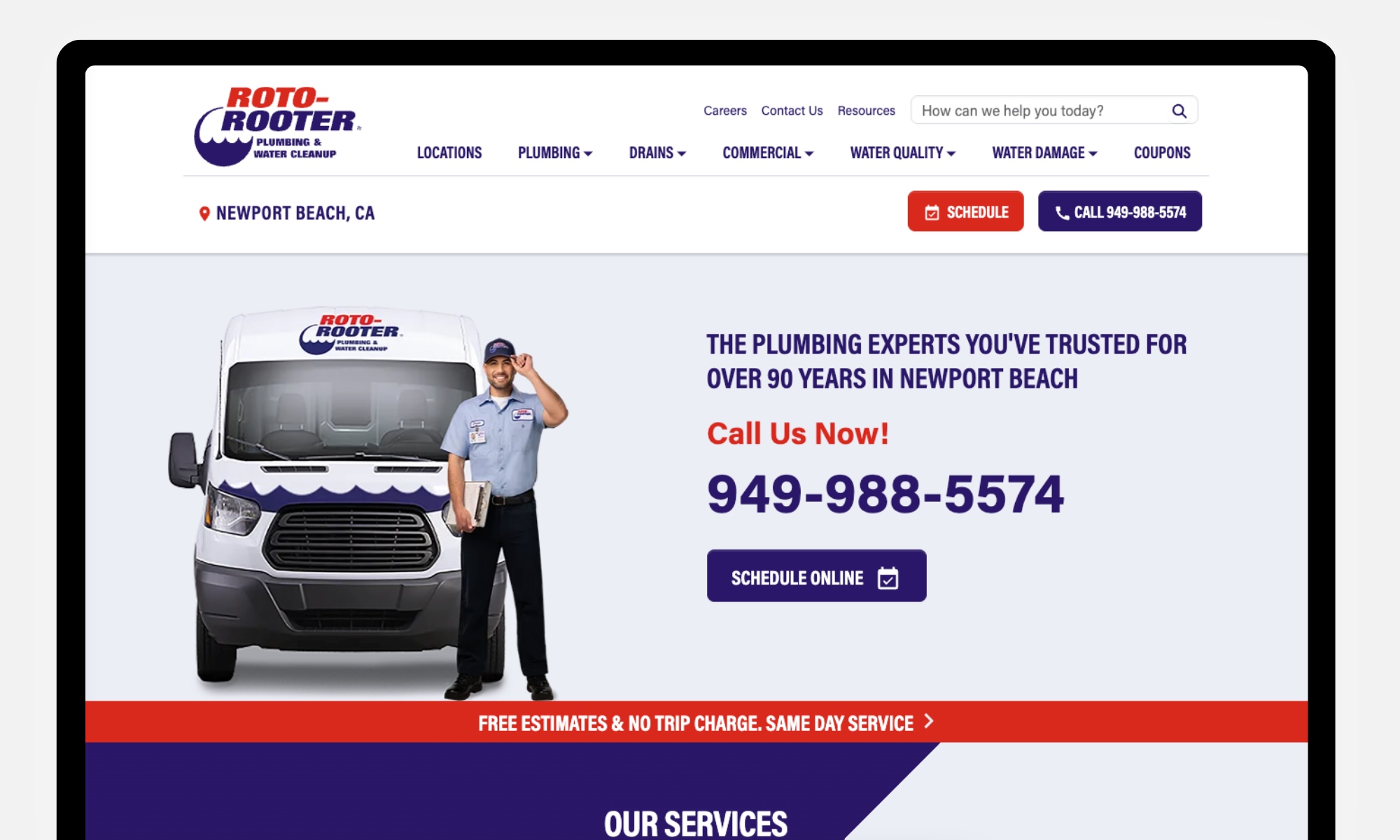
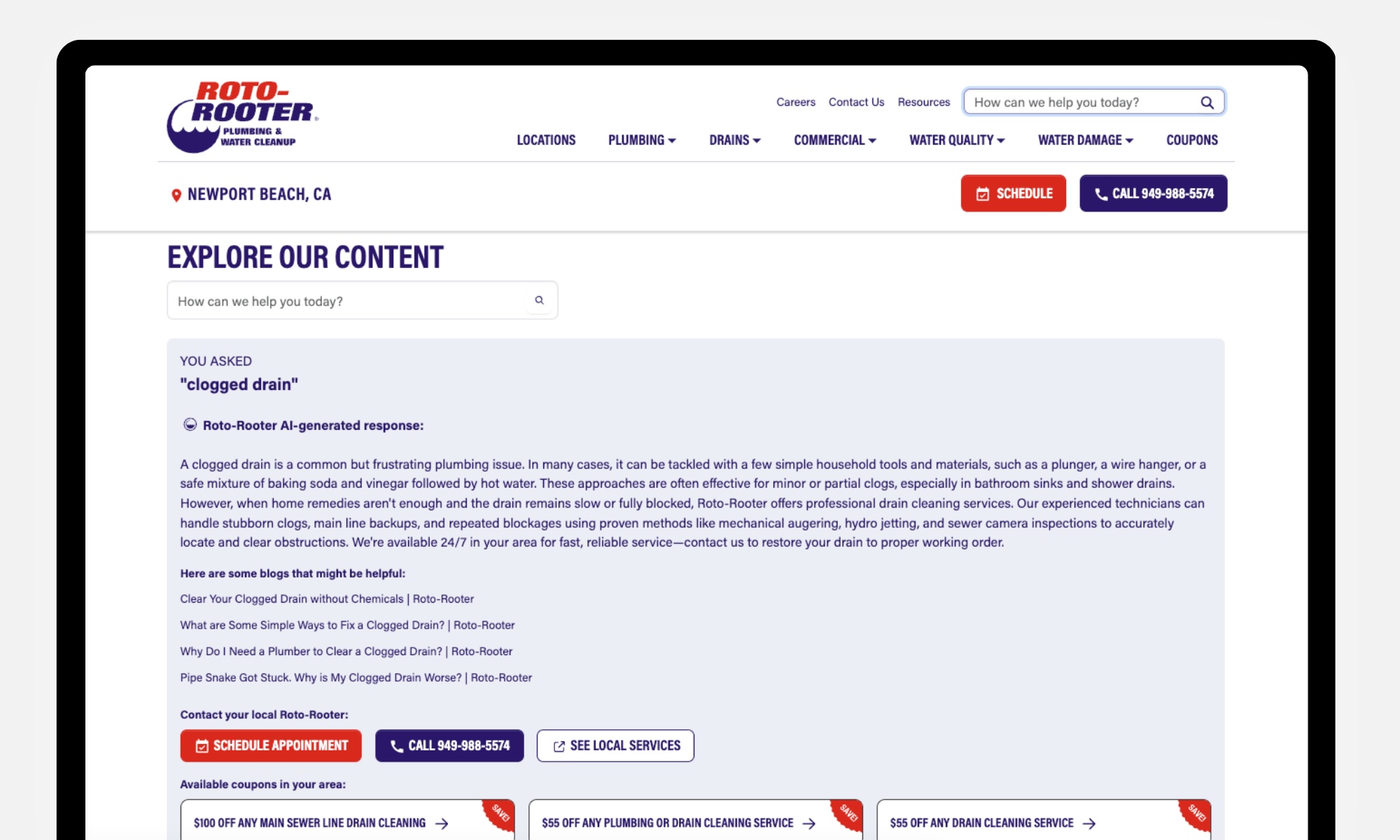
Roto-Rooter gives visitors direct routes to scheduling, calling, and finding service by location. Its service categories address familiar needs, such as drain cleaning, water heater repairs, and emergency plumbing. The site also uses AI-powered search to help customers find answers in everyday language. A search for “clogged drain,” for example, displays an AI-generated summary based on the website’s content, related articles, and options to schedule an appointment or call a local team. This brings helpful information and a clear next step together in one place.
The takeaway: Help customers move from describing a problem to finding the right support. AI-powered search can make your content easier to explore, while visible scheduling and phone options keep professional help within reach.
TruTeam: Connecting National Scale With Local Service
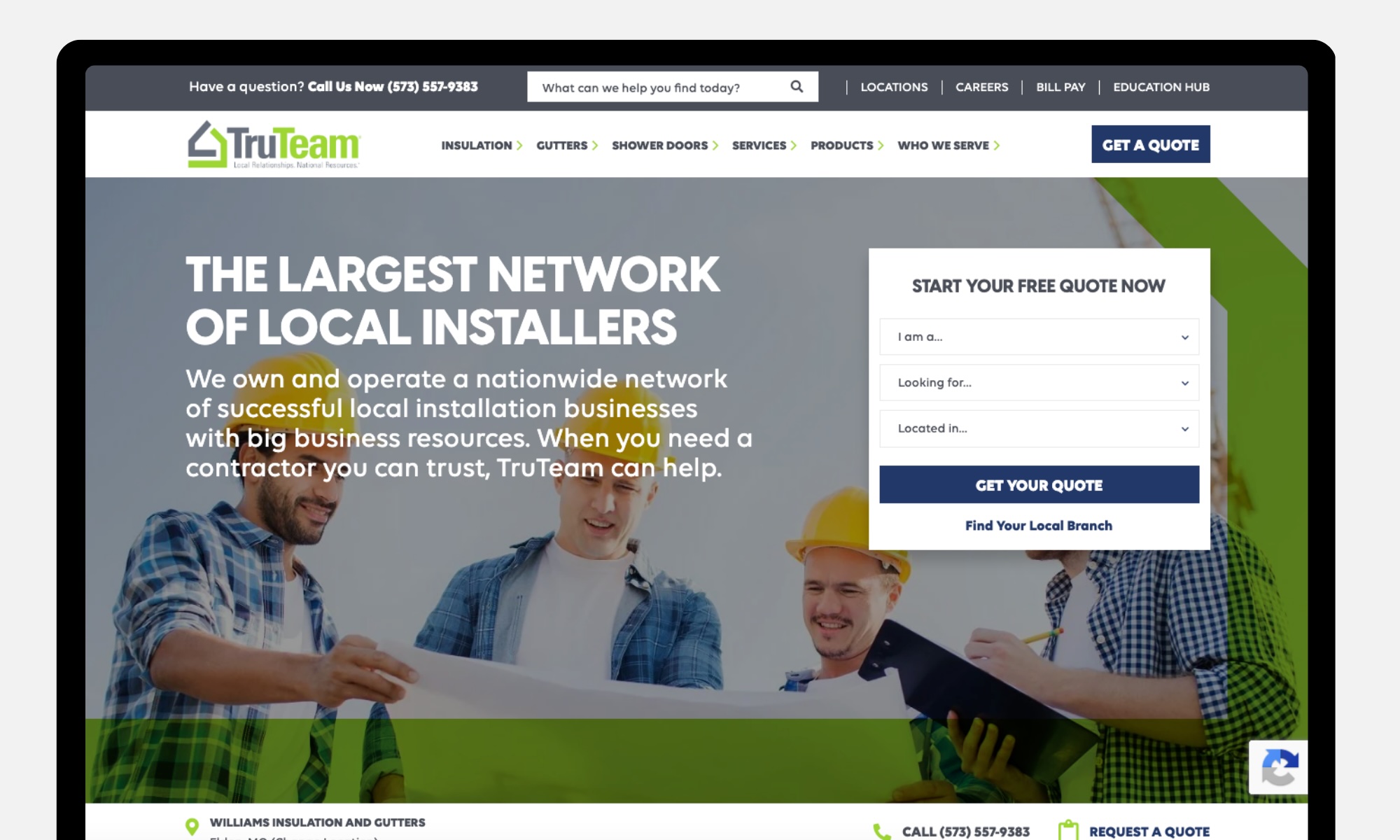
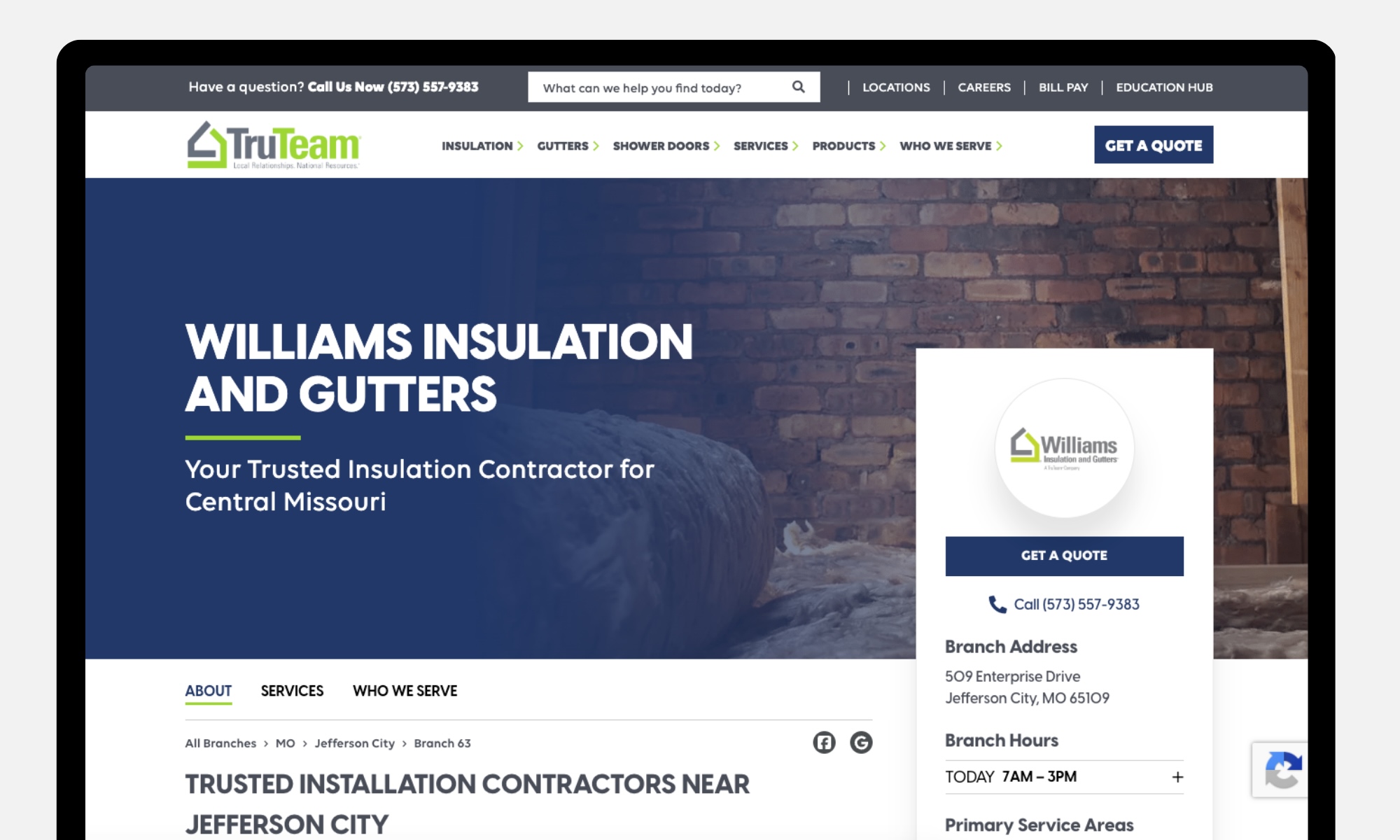
TruTeam needed clearer paths for homeowners, builders, and contractors. Fratzke redesigned the WordPress experience with audience-specific journeys, a branch locator, dedicated branch pages, and simpler quote requests. Sticky local contact elements keep the selected branch’s information and contact options within reach as visitors scroll, making it easier to connect with a nearby team.
Each branch page highlights local services and gives customers a direct path to the team serving their area.
The takeaway: For a multi-location business, finding the right local team is part of the conversion experience. Plan branch discovery and lead routing together. Explore the TruTeam case study.
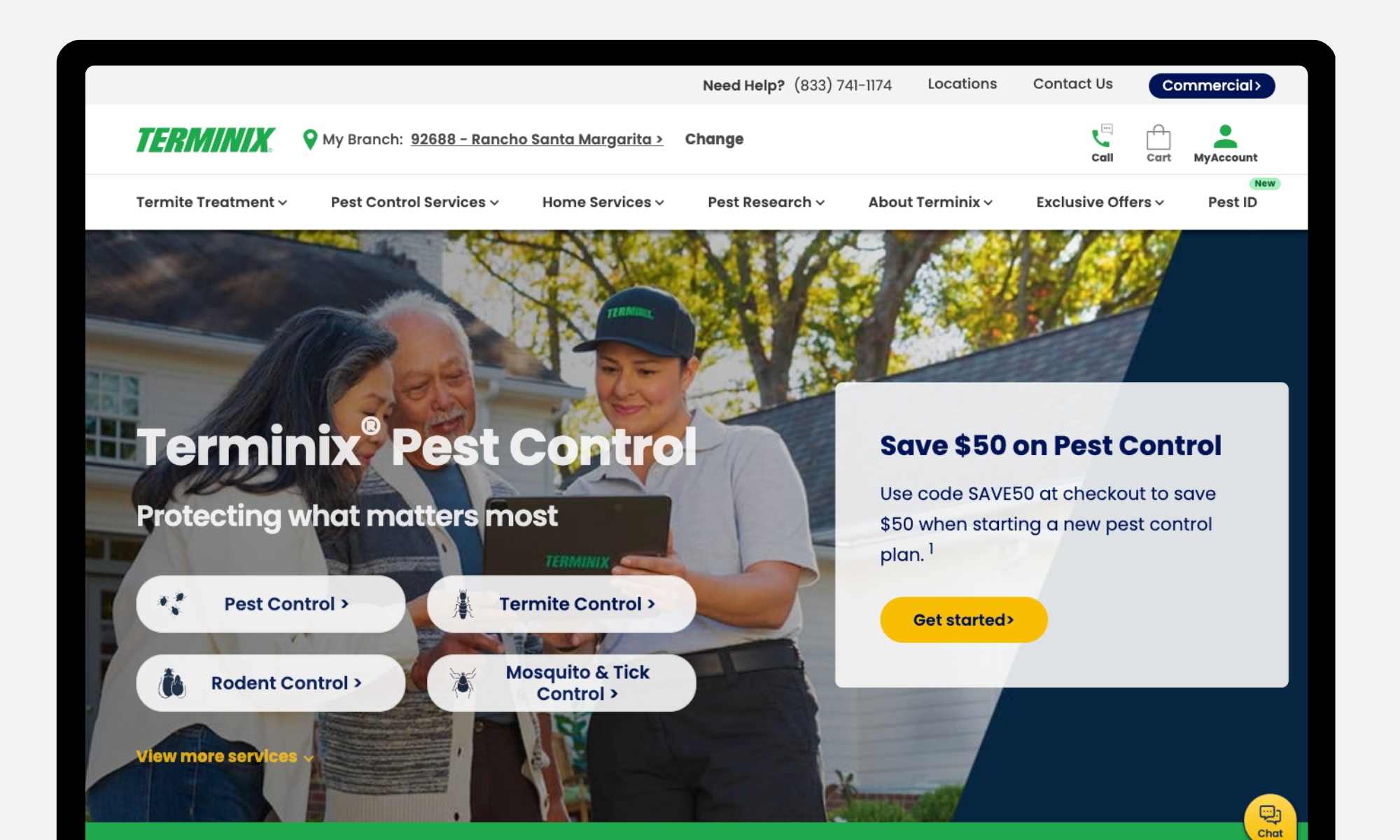
A homeowner may know they have ants in the kitchen without knowing which treatment they need. Terminix provides paths organized around specific pests, alongside educational resources and a pest-identification tool. The homepage also explains the inspection and treatment process and includes customer reviews, giving visitors more context about what to expect.
The takeaway: Organize your website around the problems customers recognize. Help them understand the issue, find the relevant service, and feel comfortable contacting your team.
Glasshouse: Showing the Craftsmanship Behind the Brand
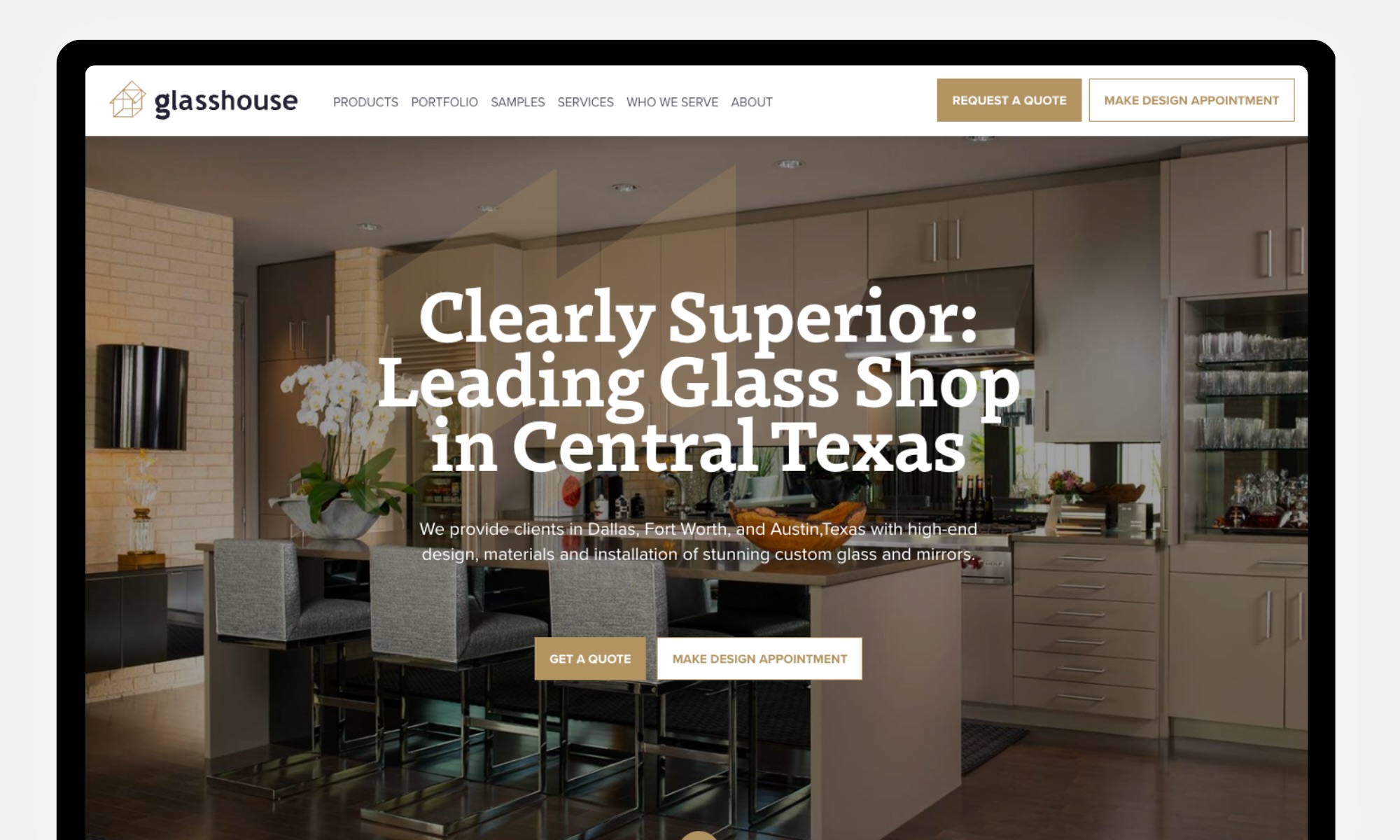
Glasshouse’s website needed to better represent its custom glass and mirror fabrication work. Fratzke began with a website audit and competitive analysis, then developed a storytelling framework and a mobile-first WordPress site with a product portfolio and sample gallery.
The takeaway: For a business selling craftsmanship, visual content helps prospective customers evaluate fit. Organize it around the products and projects people are considering. Explore the Glasshouse redesign.
TWO MEN AND A TRUCK: Helping Customers Plan With Confidence
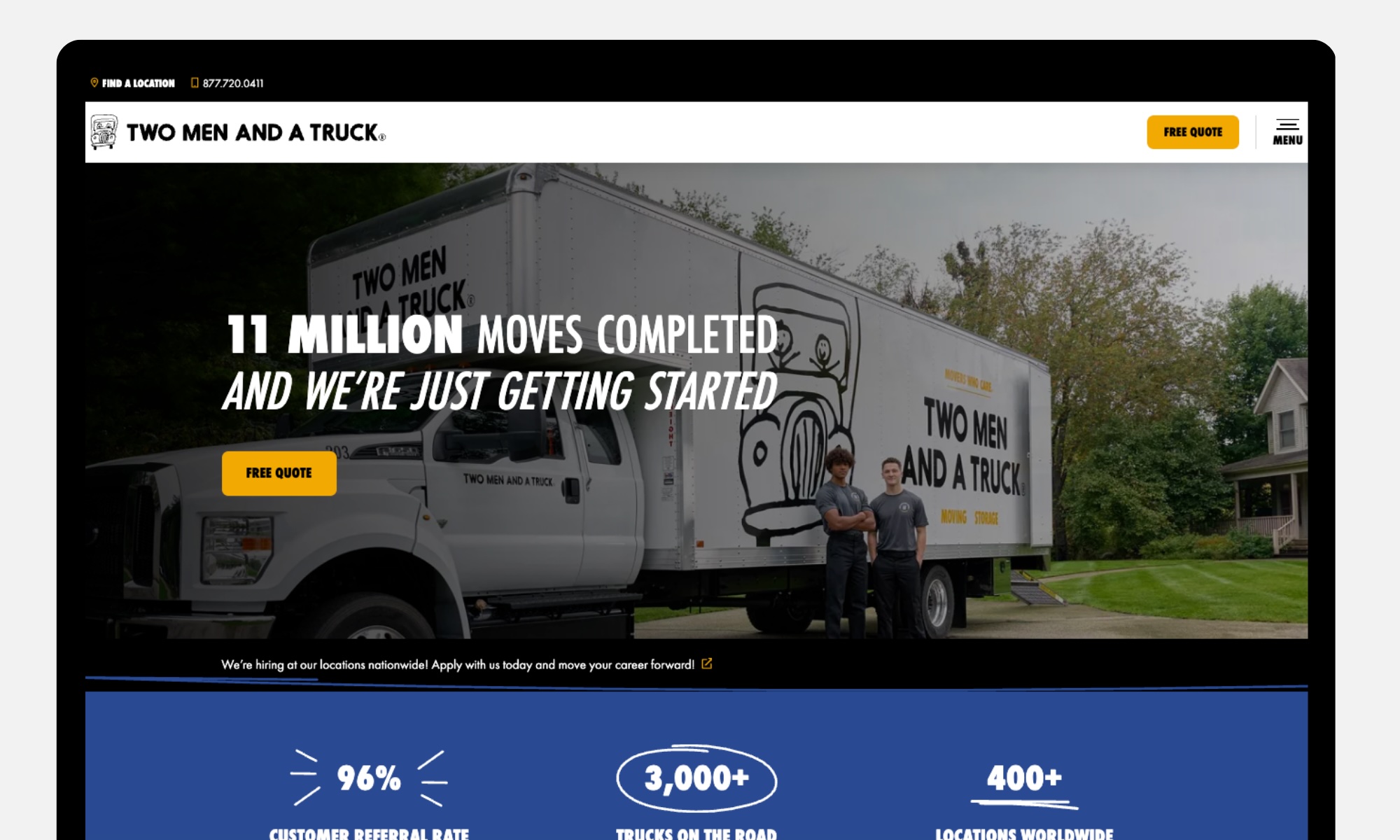
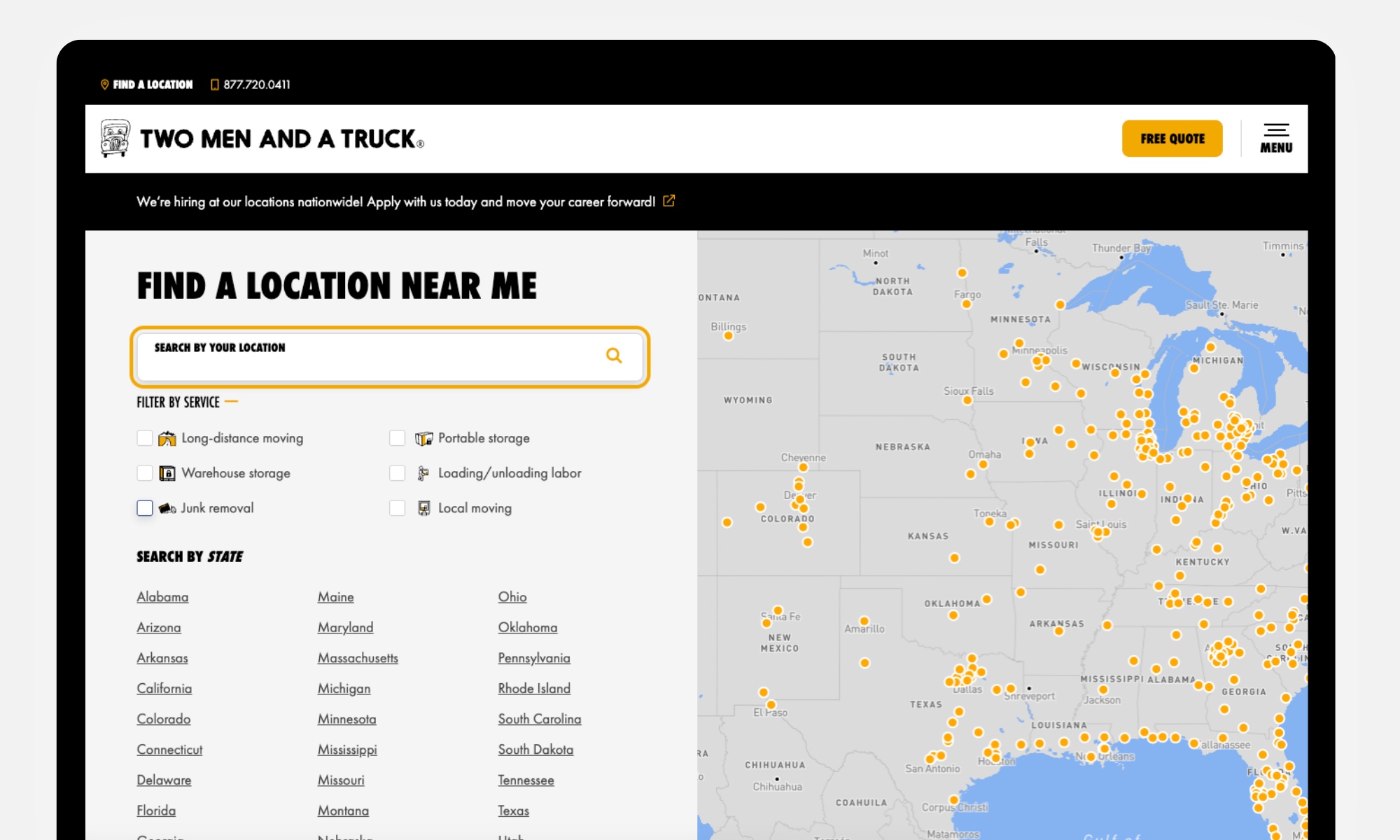
Moving comes with plenty of questions. TWO MEN AND A TRUCK organizes its services into recognizable categories, including local moving, long-distance moving, packing, and storage. A location finder helps visitors connect with a nearby team, while educational videos explain how to prepare for moving day and choose a moving company.
The takeaway: Help customers understand their options before asking them to commit. Clear service categories and practical guidance can make a complicated project feel more manageable.
How to Choose a Home Services Website Design Partner
Choose a partner whose capabilities match the complexity of the project. A focused engagement may suit an experienced freelancer. A multi-location redesign with research, content, integrations, and migration needs coordinated expertise across disciplines.
Ask prospective partners to explain the business problem behind their portfolio examples and the decisions they made to address it. Clarify who handles content, SEO, accessibility testing, integrations, analytics, and post-launch support.
Confirm ownership and access for the domain, CMS, analytics accounts, design files, and any licensed components. Ask how your team will be trained and what happens if you change providers. Our guide to hiring a website design agency can help structure the evaluation.
From Website Visits to Booked Jobs: What to Measure
Once your website is live, look at whether it’s helping your business grow. Are the right people finding you? Which marketing channels bring them in? And how many visits turn into qualified inquiries, booked jobs, and revenue?
“Your website and your marketing should work together. When you can connect a campaign to an inquiry, a booked job, and revenue, you have a much clearer picture of where to invest next.”- James Fratzke, Partner & Executive Strategist
Connecting website analytics with marketing and customer data helps you see where the experience is working and where potential business is being lost.
Understand Which Channels Bring Valuable Customers
Compare organic search, paid advertising, social media, email, and referral traffic. Each channel may attract different needs, from urgent repairs to larger projects that take longer to book.
Track these metrics by channel, service, and location where possible:
Metric
What It Tells You
Traffic & Engagement
Which channels attract visitors who explore relevant services and take action
Website Conversion Rate
How often visits lead to successful inquiries or confirmed bookings
Qualified Leads & Cost per Lead
Whether you’re attracting customers you can serve and what those opportunities cost
Lead-to-Booking Rate
How many qualified inquiries become booked jobs
Cost per Booked Job
How much marketing investment it takes to generate a booking
Revenue & Average Job Value
Which sources produce completed work and higher-value projects
Return on Ad Spend
Revenue attributed to advertising compared with ad spend, before accounting for job costs
Repeat Business
Whether customers return, renew service plans, or purchase additional services
Connect Marketing Activity to Revenue
Attribution connects customer inquiries and revenue with the marketing sources that helped generate them. Link your website analytics, campaign tracking, call tracking, and CRM or field-service system so you can follow inquiries through to completed work.
Keep source information attached to customer records, and make someone responsible for updating lead status and job outcomes. A phone-number click is not a connected call, and a form submission is not a booked job.
Attribution won’t capture every influence. Someone might hear about you from a neighbor, see an ad, and later search for your company. Use the data to guide decisions while recognizing those gaps.
Build a Website Around Your Next Stage of Growth
A useful home services website helps customers understand your value and makes it easier for your team to respond. Start with the services and markets you want to grow, examine where the current experience creates friction, and prioritize the changes that connect those two goals.
Home Services Website Design Frequently Asked Questions
What makes a good home services website design?
A good home services website makes it easy to call or book from any page, shows clearly where you work, proves you can be trusted, and loads quickly on a phone. Behind the scenes, it tracks which pages and channels produce booked jobs.
How much does a home services website cost?
Cost depends on the number of services and locations, integrations such as scheduling or CRM, custom design needs, and content. A single-location template site and a multi-location custom platform are very different investments. Ask partners to price discovery, design, development, content, and post-launch support separately so you can compare proposals.
How long does it take to build a home services website?
Timelines depend on scope, content readiness, and approvals. Multi-location sites with integrations take longer than single-location sites. Starting with an audit and a clear site map helps avoid delays later in the project.
How many pages should a home services website have?
At minimum, plan a homepage, one page per core service, one page per priority service area, an About or team page, reviews, financing (if offered), and contact or booking. Larger companies often add resources and FAQs that answer common homeowner questions.
Should every location have its own website?
Separate websites may make sense for distinct brands or independently managed businesses. A shared site with useful branch pages may better suit a unified brand. Decide based on brand structure, customer needs, operating responsibilities, and your ability to maintain accurate content across the network.
Do home services companies need online booking?
Most benefit from offering it alongside the phone. A short request form or booking integration captures customers who prefer not to call, including after-hours visitors and many younger homeowners.
How does website design affect local SEO for home services?
Site structure, page speed, mobile usability, service and location pages, and schema markup all influence how you appear in local and AI search. Learn more in our SEO for Home Services guide.
Can a redesign affect existing search visibility?
Yes. Changing URLs, removing useful content, or altering navigation can affect how search engines access and understand the site. Include SEO in the project from discovery through launch, document redirects, and monitor indexing and performance afterward. No migration plan can guarantee unchanged rankings.
Should the website include an AI chatbot?
Consider one when it can reliably answer relevant questions or help customers reach the correct team. Define its information sources, escalation path, and limits. It should not invent prices or availability, and visitors should still have a clear way to contact a person.
How do I know if my home services website needs a redesign?
Watch for falling call and form volume, high mobile bounce rates, slow load times, missing service or location pages, and a CMS your team avoids updating. A Home Services Marketing Audit shows which issues to fix first.
Fratzke is a top-rated strategic agency that helps mid-market and enterprise brands spark growth through customer insights, brand strategy, marketing, and creating digital experiences. Since our founding in 2017, we've worked with leading brands across industries including Razer, TopBuild, REI, DTS, and TiVo, partnering from research and strategy through implementation. We combine data, technology, and human-centered storytelling to help brands better understand their customers, strengthen their market position, and create consistent growth over time. Learn More.
Build a Stronger Marketing Strategy For Your Home Services Business
Turn your business goals into a marketing strategy designed to reach more homeowners, turn leads into booked jobs, and keep customers coming back.


.png)